Introduction to DOM
The Document Object Model, or simply called the DOM, is nothing but a representation of the contents of a web page in the form of an object. In other words, using the document object, we can change the structure of a page or manipulate it using different properties.
Wait, what ? What’s this document object that I’ve been blabbering about.

An object has so many properties ( in the form of key : value pair of course ) associated with it, see for yourself when you type in something like dir(document).
dir () is a method that displays the properties of the specified object.

You might like this official definition from the docs:
""The Document Object Model (DOM) is a programming interface for HTML and XML documents. It represents the page so that programs can change the document structure, style, and content. The DOM represents the document as nodes and objects. That way, programming languages can connect to the page.""
One interesting thing about DOM is that every HTML element becomes or behaves like an object, whether it’s a p tag, head tag or a body tag.
Traversing the DOM
You wouldn’t believe that DOM behaves like a tree. It has nodes, children, siblings and what not. Traversing means to access the document elements in a systematic manner. What do we plan to achieve by accessing those elements ? Let’s save this for later.
Below are some of the methods which are used to select the elements.
querySelector()
It is a method of the document object and, in technical terms, is provided by a special property called _proto_. In fact, all the methods that we use, are present in the prototypal chain.
document.querySelector(".className");
document.querySelector("#idName");
document.querySelector("tagName");
getElementById()
This method returns the element that contains the id passed into it. JavaScript searches the id in the HTML and if found, returns the element having that particular id.
document.getElementById("idName");You could read more about methods here.
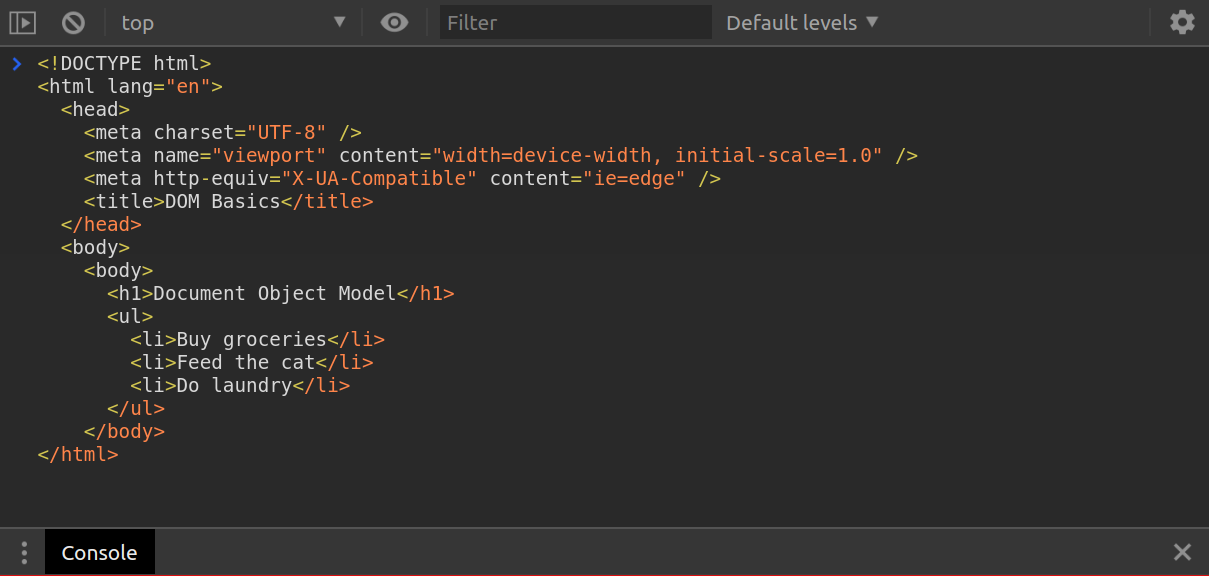
What we see here is a normal looking HTML structure having head, body etc. If we try and see it in terms of the DOM tree, what would we say ?
<html> is the root element having <head> and <body> as its children. Further, <body> has two children, namely <h1> and <ul>. We’ll stick to the same parent, child, sibling terminology, no matter how complex the structure gets.
As we have seen, we can select elements using various methods. So, if we want to select first <li> of <ul>, what would we do ? Let’s see.
document.querySelector("ul").firstElementChild;

// <li>Buy groceries</li>
To access a sibling element, we’ ll use previousElementSibling and nextElementSibling. We could also use children[index] to go to a child element having that particular index.
Coming to that previous question- What are we planning to achieve, just by selecting an element ? Well, we could change its properties like color, font-size, font-family etc. After that, comes the main use-case of DOM i.e., Events.
Events
I’ll try to give you a general idea about events in this section. Well, an element changes its property or shows behaviour when an event occurs on it. There are hundreds of known events like click, mousemove. dblclick, keyup, mousedown, input, and many more.
function changeBg() {
  document.body.style.background = "hotpink";
}

button.addEventListener("click", changeBg);
An event “click” is going to occur on the button element and when that occurs, addEventListener() calls the function changeBg, which in turn changes the background of the body. So, whenever someone clicks on the button, background of the body changes to hotpink. In a similar manner, we could’ve used mousemove or keyup events in place of click, however, the functionality remains the same.
Let’s create something
We’ve come so far in this article, why not create something, so that we could comprehend things better. Now, I’m going to create a random quote generator, using HTML, CSS, and some JavaScript.
Here’s the folder structure for this project.

This is the HTML file.

Now, shift your focus to this index.js file that we have in our project. You might be thinking, why an Array of objects ? Don’t worry, you’ll find out later.
So, all we have is an array containing objects having properties “quoteText” and “quoteAuthor”. It contains some of my favorite quotes of all time :)

Goal: To generate a random quote when the button gets clicked on.
We have to generate a random quote, right ? Where do we get our quotes from ? That’s why we’ve defined an array. Our job is to grab a random quote from the array and display it onto the screen. How do we do that ?
What’s happening here ?
Event is occuring on the button element and when it gets clicked, a callback function named quoteGenerator() gets called and, gets executed.

Well, how do we select something from an array ? From its index, right ? This is how we’re going to select our quote. randomNumber is returning a random index number everytime upto the length of our quotes array. In the next step, JavaScript is grabbing the elements by the class name “quote_section” and “author_section” i.e., the div element and p element respectively.
Now, we need a way to use the value of randomNumber to randomly retrieve a quote from the quotes array and place the quote into our HTML document and display it onto the screen. We’ll use the innerHTML property here.
document.querySelector(".quote_section").innerHTML = quotes[randomNumber].quoteText;
document.querySelector(".author_section").innerHTML = quotes[randomNumber].quoteAuthor;
And since, there are objects present in the array, we’ll use the dot notation to select the value of the respective key, i.e.,
quotes[randomNumber].quoteText;
quotes[randomNumber].quoteAuthor;
Here’s our Quote Generator

Thank You for reading this article!!

